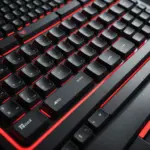
The Surface 4 Type Cover is a detachable keyboard designed to make a compatible Surface tablet feel more like a compact laptop. It combines a physical keyboard, integrated trackpad, and protective screen cover in one slim accessory. For people who regularly switch between touch input and traditional typing, it offers a convenient way to carry a more flexible work setup without adding the bulk of a separate keyboard.
What the Surface 4 Type Cover does
The Type Cover attaches to the lower edge of the Surface tablet through a magnetic connector. Once attached, it provides a stable typing surface and communicates with the device through the physical connection rather than relying on a separate wireless pairing process. Folded back, it can support tablet-style use; closed over the display, it helps protect the screen during transport.
This integrated design is the main reason to choose a Type Cover over a generic Bluetooth keyboard. There is no loose accessory to position on a desk, and the keyboard remains matched to the tablet’s dimensions. The result is a setup that can move quickly from tablet mode to laptop-style work.
Design and everyday usability
The Surface 4 Type Cover is slim and lightweight, making it suitable for bags, classrooms, commuting, and travel. Its outer covering is soft to the touch on some versions, while the keyboard section has enough structure to provide a more stable typing platform than many thin mobile keyboards. Available finishes include understated options such as a black Type Cover, which can suit professional or shared working environments.
Because the cover is shaped for a specific Surface device, it preserves the tablet’s compact form rather than turning it into a large laptop-style package. That portability is useful for anyone who wants to read, draw, browse, or use touch controls without carrying a second input device.
Typing and trackpad experience
The keyboard uses a compact laptop-style layout with shallow keys, a row of function keys, and an integrated trackpad. The key travel is shorter than on a traditional desktop or mechanical keyboard, but the layout remains familiar enough for email, note-taking, document editing, and general productivity.
Typing comfort depends on personal preference and the surface underneath it. On a desk, the cover can feel more controlled than a loose portable keyboard because it is held in place by the Surface connection. On an uneven lap or soft surface, the slim construction may feel less substantial than a conventional laptop keyboard.
The trackpad is particularly useful when applications require precise pointer control. It removes the need to carry a separate mouse for many everyday tasks, although users who perform detailed editing or prefer a larger pointing surface may still want an external mouse.
Compatibility: check before buying
Compatibility should be the first consideration when replacing or purchasing a Surface 4 Type Cover. The connector position, dimensions, and physical design must match the intended Surface tablet. Similar-looking Type Covers from other generations may not be interchangeable, even when their appearance is nearly identical.
Before ordering, confirm the exact Surface model and compare it with the seller’s compatibility information. This is especially important when buying a used or refurbished accessory, where the product title may use broad terms such as “Surface keyboard” without identifying the supported device. A correct fit should allow the cover to attach securely and the keyboard and trackpad to function without relying on Bluetooth.
Who should consider the Surface 4 Type Cover?
The accessory is a practical choice for Surface owners who want a portable keyboard that is always ready to use. It may be especially useful for:
- Students taking notes or writing assignments away from a desk.
- Professionals who travel and need a compact document-editing setup.
- Users who alternate between touch, pen, and keyboard input.
- Anyone who wants a keyboard that also covers the tablet display.
It is less suitable for people seeking a full-size keyboard, deep key travel, mechanical switches, extensive customization, or a large independent trackpad. In those cases, a desktop keyboard or a separate Bluetooth model may provide a better typing experience, provided portability and a permanently attached cover are less important.
Care, inspection, and replacement
Keep the Type Cover dry and clean. Dust around the keys can be removed with a soft brush or carefully directed compressed air, while the exterior can be wiped with a slightly damp cloth. Avoid allowing moisture to reach the connector, keyboard, or trackpad, and close the cover when transporting the Surface to help shield the screen.
When evaluating a used Type Cover, test every key, the trackpad, the magnetic connection, and the folding sections. Sticky or unresponsive keys, unreliable pointer movement, visible separation in the cover, or a connection that repeatedly drops can indicate that replacement is more practical than continued use.
Final buying considerations
The Surface 4 Type Cover is best understood as an integrated Surface accessory rather than a general-purpose keyboard. Its strengths are portability, quick attachment, device-specific fit, and the convenience of combining keyboard and screen protection. Confirm compatibility first, then consider your typical tasks, preferred typing feel, and the condition of any second-hand unit before making a purchase.