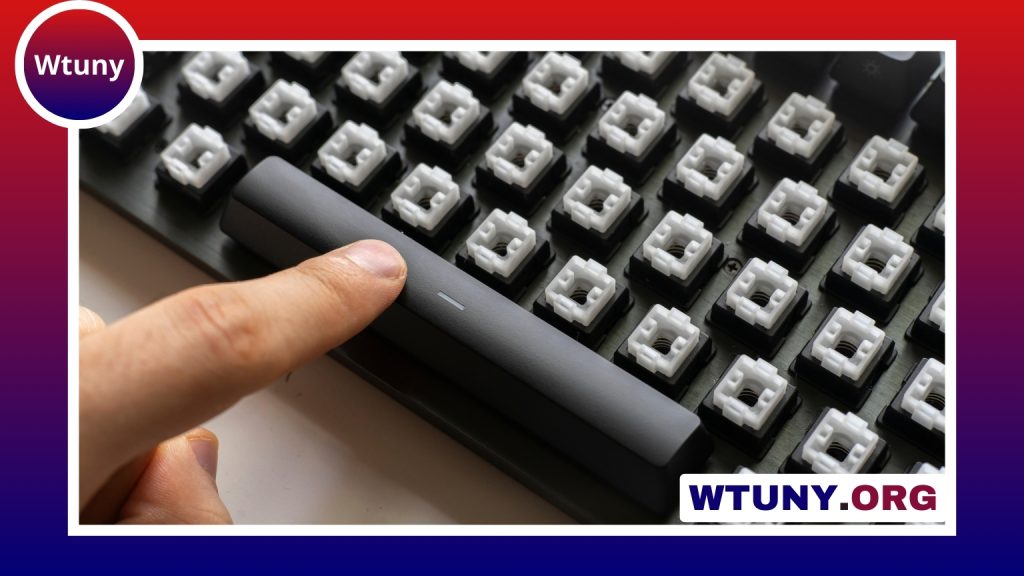
Mechanical keyboards use a separate physical switch beneath every key. That design gives each press a distinct feel and sound, while also making the keyboard easier to customize and repair than many membrane-based alternatives. They appeal to people who type for long periods, play games, write code, or simply want a more deliberate and satisfying typing experience.
How a mechanical keyboard works
Pressing a key moves a mechanical switch until it registers an input on the keyboard’s printed circuit board (PCB). The switch, rather than a shared membrane, determines much of the key’s movement, resistance, feedback, and sound.
A typical keyboard also includes several other important parts:
- Keycaps: The removable tops that your fingers contact. Their material and shape affect comfort, sound, and appearance.
- Plate: A structural layer that holds the switches in position and influences the keyboard’s rigidity and acoustics.
- Stabilizers: Components beneath wider keys such as the space bar, Enter key, and Shift keys. They help those keys move evenly.
- PCB: The circuit board that detects key presses and sends them to the computer.
Features such as anti-ghosting and n-key rollover help the keyboard recognise multiple simultaneous key presses accurately. These capabilities can be useful for fast typing and gaming, although their practical importance depends on how the keyboard will be used.
Understanding mechanical switch types
Mechanical switches are commonly grouped into three categories: linear, tactile, and clicky. The right choice is a matter of preference, typing habits, and surroundings.
Linear switches
Linear switches move smoothly from top to bottom without a tactile bump or deliberately added click. Their consistent travel is often attractive to gamers and to users who prefer an uninterrupted key press. They can, however, provide less physical feedback when a key actuates.
Tactile switches
Tactile switches have a noticeable bump during the key’s travel. This feedback can help typists recognise a press without bottoming out every key, and many writers and programmers enjoy the more defined feel. The strength of the bump varies considerably between switch designs.
Clicky switches
Clicky switches combine tactile feedback with an intentionally audible click. Some users find the sound especially satisfying, but it may be distracting in an office, shared room, or other quiet environment. If noise is a concern, linear or quieter tactile options are usually easier to live with.
When comparing switches, look beyond the category name. Actuation force, travel distance, sound, and the overall smoothness of the switch all affect the experience. Mechanical, optical, low-profile, and other switch designs can offer different compromises in speed, size, feel, and compatibility.
Choose the layout before the extras
Keyboard size has a major effect on desk space and everyday convenience. Common layouts include:
- Full-size: Includes the number pad and is useful for frequent data entry or work involving many numerical inputs.
- Tenkeyless (TKL): Removes the number pad while retaining the function row and navigation keys, creating more room for a mouse.
- Compact layouts: 60- and 65-percent keyboards reduce size further. They save space and are portable, but some keys may be accessed through layers or function combinations.
Next, consider connectivity. Wired keyboards offer a straightforward connection and avoid battery management. Wireless models can create a cleaner desk and improve portability, but battery life and Bluetooth stability should be part of the decision. A hot-swappable PCB is also valuable if you want to try different switches without soldering.
Customization options
Customization is one of the defining attractions of mechanical keyboards. Changing keycaps is an accessible starting point. PBT keycaps are generally valued for their resistance to developing a shiny surface, while ABS keycaps can offer a smoother feel and a different sound. The keycap profile also changes finger position and the shape of the typing experience.
More involved modifications include replacing or tuning stabilizers, lubricating compatible switches to reduce friction, and choosing a plate or case that produces a preferred sound. These changes can be made gradually; there is no need to build a keyboard from individual parts to benefit from customization.
Some keyboards support firmware such as QMK or VIA, allowing users to remap keys, create layers, and configure macros. This can be particularly useful for software shortcuts, repetitive workflows, or compact layouts that place secondary functions behind a modifier key.
Maintenance and long-term care
Routine cleaning helps prevent dust and debris from affecting key travel. Remove the keycaps when necessary, use a soft brush or appropriate compressed air to clear the plate, and wash keycaps separately before allowing them to dry fully. Avoid directing moisture into the switches or PCB.
If a key begins to feel inconsistent, first check for debris and make sure the keycap is seated correctly. A problem with a larger key may involve its stabilizer. On a hot-swappable keyboard, an unreliable switch can often be replaced individually; other designs may require more involved repair.
Keep drinks away from the keyboard and respond quickly to spills. Disconnect the keyboard, avoid continuing to power it, and allow it to dry thoroughly before testing it again. Wireless users should also monitor battery condition and apply firmware updates when appropriate.
Finding the right mechanical keyboard
The best mechanical keyboard is the one that suits your hands, workspace, and routine. Start with the required layout, connection type, and noise level, then compare switch feel and useful features. A prebuilt keyboard can be the simplest choice, while a hot-swappable model provides room to experiment. With suitable switches, comfortable keycaps, and basic care, a mechanical keyboard can remain a dependable part of a desk setup for years.
Related Guides